10 Free WhatsApp Tools Every User Needs in 2026 — Boost Chats, Save Time & Do More
10 Free WhatsApp Tools Every User Needs in 2026
Boost your chats, save hours of effort, and unlock features your default app never offered — all with free tools that work in seconds.
📖 Why You Need These WhatsApp Tools
WhatsApp is used by over 2 billion people worldwide — yet most users only scratch the surface of what is possible. The default app is great for messaging, but it does not give you everything: a better emoji picker, a link generator you can share anywhere, a chat widget for your website, or a way to format your text more expressively.
That is where free WhatsApp tools come in. In 2026, a growing collection of free browser-based tools lets anyone — whether you are chatting casually, running a small business, or managing a WhatsApp community — get far more out of every conversation. No installs, no subscriptions, no hidden costs.
Below are the 10 best free WhatsApp tools every user should know about this year. Each one solves a real problem and works instantly in your browser.
🔟 The 10 Free WhatsApp Tools
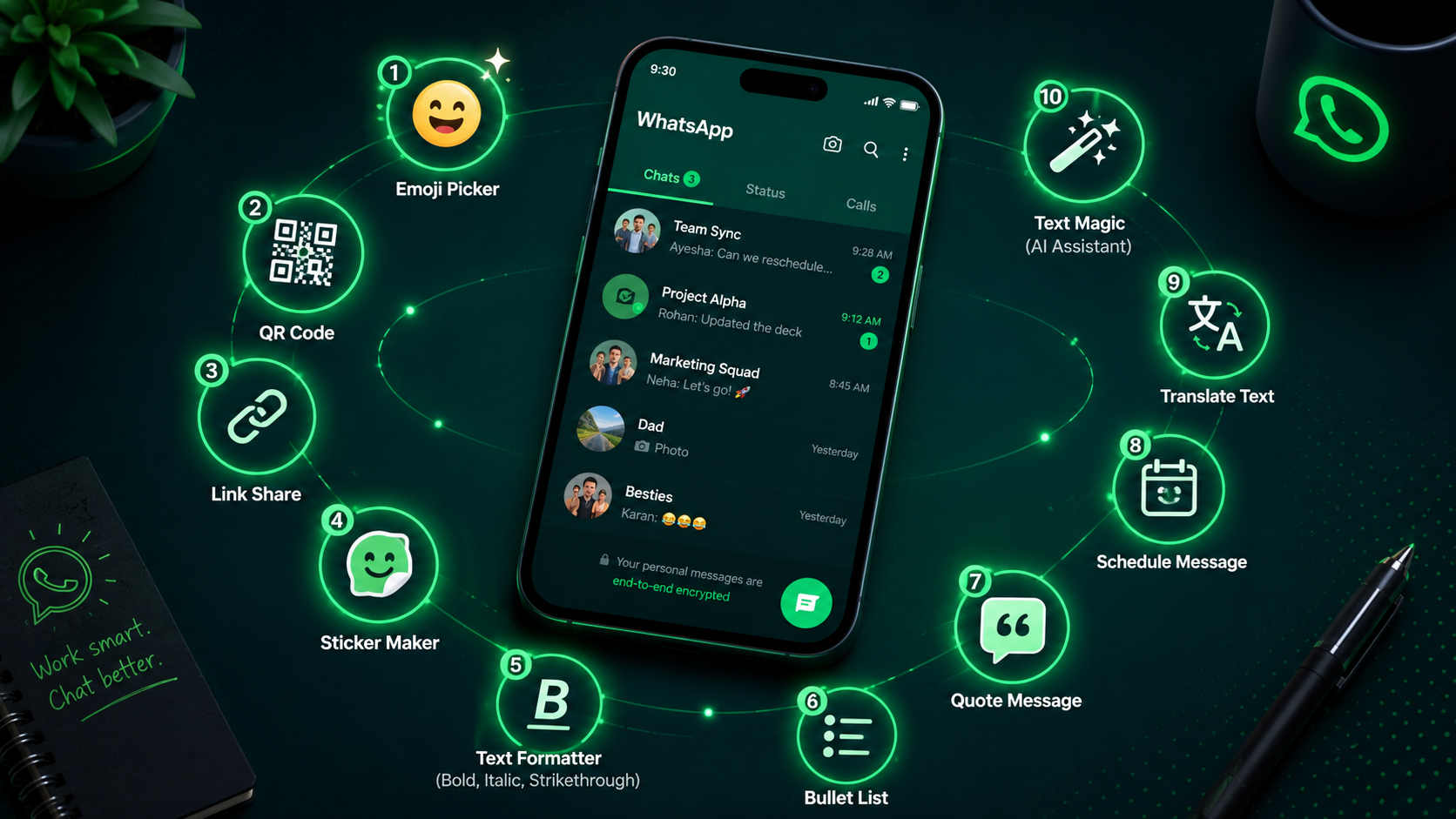
Here is the complete list — from emoji pickers and link generators to QR code makers and text formatters:
WhatsApp Emoji Picker
The built-in emoji keyboard on your phone is slow to scroll and hard to search. A dedicated WhatsApp Emoji Picker gives you the full Unicode emoji library — thousands of emojis organised by category — with a search bar, hover previews, and one-click copy. It works perfectly on desktop where WhatsApp Web's emoji panel is especially clunky.
Just open the tool, type a keyword like "fire" or "heart", click the emoji, and paste it directly into WhatsApp. It takes about three seconds from start to finish.
WhatsApp Link Generator
A WhatsApp Link Generator creates a shareable URL — like wa.me/923001234567 — that opens a WhatsApp chat directly with your number when clicked, without the other person needing to save your contact first. You can include a pre-filled message too, which is incredibly useful for businesses, freelancers, and creators sharing their contact link on social media or websites.
Enter your phone number, add an optional default message, and the tool generates your link instantly. Share it anywhere — Instagram bio, email signature, business card QR code.
WhatsApp QR Code Generator
Once you have your WhatsApp link, a QR Code Generator turns it into a downloadable QR code image that anyone can scan with their phone camera to start a chat instantly. This is perfect for printed materials — business cards, flyers, menus, shop windows, and exhibition stands — where typing a phone number or URL is inconvenient.
Generate the QR code in seconds, download as a PNG or SVG, and place it anywhere you want people to reach you on WhatsApp without any friction.
WhatsApp Text Formatter
WhatsApp supports text formatting — bold with asterisks, italic with underscores, strikethrough with tildes, and monospace with backticks — but remembering the syntax is annoying and typing it manually slows you down. A WhatsApp Text Formatter lets you write your message normally, apply formatting with buttons, and copy the finished result ready to paste.
It is especially useful for sending announcements, business broadcasts, or structured messages in group chats where visual formatting makes a big difference to readability.
WhatsApp DP Maker
WhatsApp crops and compresses profile photos, and if your image is not the right dimensions or aspect ratio, the result can look stretched or poorly framed. A WhatsApp DP (Display Picture) Maker lets you upload any photo, crop it to the ideal square format, adjust focus, and download a perfectly sized image ready to set as your WhatsApp profile picture.
Some tools also let you add coloured borders, frames, or text overlays — useful for businesses wanting a branded look, or users celebrating occasions like birthdays or national days.
WhatsApp Chat Analyzer
WhatsApp lets you export any chat as a .txt file, and a Chat Analyzer tool reads that export to give you fascinating statistics — who sends the most messages, what time of day you chat the most, the most frequently used words and emojis, message streaks, and more. It is a fun way to look back on friendships, relationships, or team group chats.
All processing happens locally in your browser, so your private messages never leave your device.
WhatsApp Chat Widget Generator
If you run a website or online store, a WhatsApp Chat Widget Generator creates a floating "Chat on WhatsApp" button that you embed on your site with a small snippet of HTML. When visitors click it, they are taken directly to a WhatsApp chat with you or your business number — complete with a pre-filled greeting message you customise.
Studies consistently show that WhatsApp chat buttons on websites significantly increase customer enquiry rates, especially for service businesses, e-commerce stores, and local shops.
WhatsApp Message Without Saving Number
Need to message someone once — a vendor, a delivery driver, a new acquaintance — without cluttering your contacts list? A "Message Without Saving" tool generates a direct wa.me link or lets you enter a number and open a chat instantly, without adding the contact to your phone. This is one of the most popular WhatsApp convenience tools and takes just five seconds to use.
It is especially popular in Pakistan, India, and the Middle East where WhatsApp is the primary communication method for both personal and business use.
WhatsApp Sticker Maker
Custom stickers are one of the most popular features on WhatsApp, and a Sticker Maker tool lets you create your own from photos in minutes. Upload an image, crop it, remove the background, add optional text or effects, and download a sticker pack ready to import into WhatsApp. No design skills are needed — most tools are drag-and-drop simple.
Make stickers of your friends, your pets, your brand logo, or any meme-worthy moment. Custom stickers are a great way to personalise group chats and make conversations more fun.
WhatsApp Broadcast Message Scheduler
For businesses and community managers, a Broadcast Message Scheduler or template builder helps you plan and write WhatsApp broadcast messages in advance, with proper formatting, emoji placement, and character counts — so you are never composing an important message on the fly. While fully automated sending typically requires the WhatsApp Business API, free tools help you draft, preview, and copy polished messages ready to send at the right moment.
Pair it with the WhatsApp Text Formatter (tool #4) and the Emoji Picker (tool #1) for professional-looking broadcasts every time.
📋 Quick Comparison — All 10 Tools at a Glance
Here is a summary of all 10 free WhatsApp tools, who they are best for, and whether they work on mobile and desktop:
| # | Tool | Best For | Mobile | Desktop |
|---|---|---|---|---|
| 1 | Emoji Picker | Everyone | ✓ | ✓ |
| 2 | Link Generator | Businesses & Creators | ✓ | ✓ |
| 3 | QR Code Generator | Shops & Printed Materials | ✓ | ✓ |
| 4 | Text Formatter | Groups & Broadcasts | ✓ | ✓ |
| 5 | DP Maker | Personal & Business Profiles | ✓ | ✓ |
| 6 | Chat Analyzer | Curious Users & Friends | ✓ | ✓ |
| 7 | Chat Widget Generator | Website Owners | — | ✓ |
| 8 | Message Without Saving | Everyone | ✓ | ✓ |
| 9 | Sticker Maker | Everyone | ✓ | ✓ |
| 10 | Broadcast Scheduler | Business Owners | ✓ | ✓ |
🌟 Why These Tools Make a Real Difference
Save Time Every Day
Stop hunting through menus. The right tool puts exactly what you need one click away.
Look More Professional
Formatted messages, branded QR codes, and polished broadcasts make a real impression.
Zero Cost
Every tool on this list is completely free. No trial periods, no credit card required.
Safe to Use
Browser-based tools like the chat analyzer process data locally — nothing is uploaded to servers.
Works on Any Device
Phone, tablet, or desktop — these tools are fully responsive and work in any modern browser.
No Install Needed
Open in a browser tab and start using immediately. No app stores, no permissions, no waiting.
❓ Frequently Asked Questions
🛠️ Start Using These Tools Today
All 10 tools are free, instant, and work in any browser. Begin with the Emoji Picker — one of the most useful WhatsApp tools available right now.
Open Emoji Picker — Free →