WhatsApp Account Banned — How to Recover Your Account Fast in 2026
WhatsApp Account Banned — How to Recover Your Account Fast in 2026
Learn why WhatsApp bans accounts, how to submit an appeal successfully, and the fastest way to recover your WhatsApp account safely in 2026.
Getting your WhatsApp account banned can feel frustrating, especially if you rely on WhatsApp for business, client communication, or daily personal conversations. One moment your chats work perfectly — the next, you see a warning saying your account can no longer use WhatsApp. The good news is that many bans are temporary and recoverable if you follow the correct steps. In this complete 2026 guide, you'll learn why WhatsApp bans accounts, how to recover access, how long recovery usually takes, and how to avoid getting banned again in the future.
Why WhatsApp Bans Accounts
WhatsApp actively protects its platform from spam, scams, fake accounts, and abusive behavior. If the system detects suspicious activity, your number may receive a temporary restriction or a permanent ban.
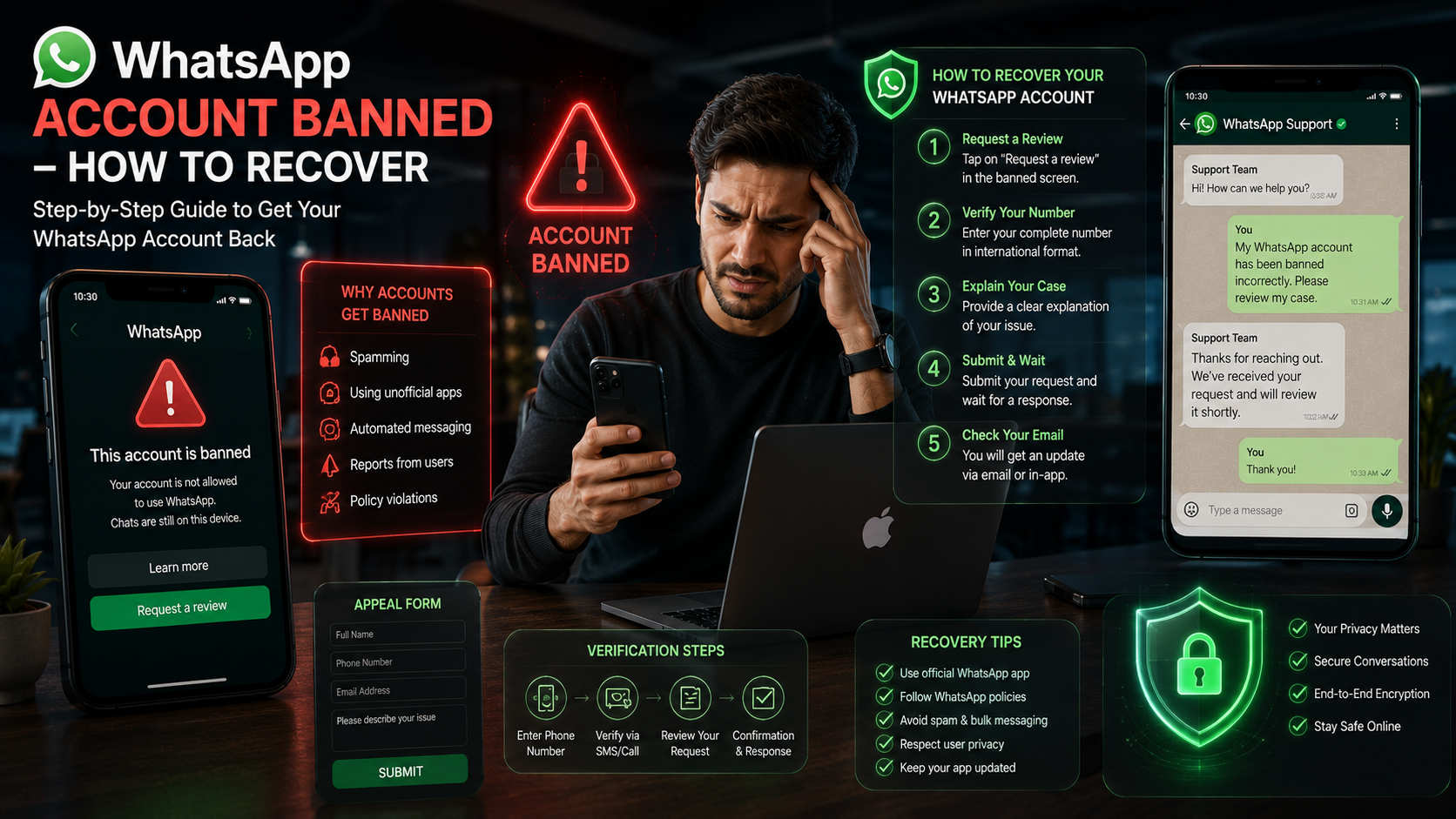
The most common reasons include sending bulk spam messages, using unofficial WhatsApp apps, getting reported by many users, automating messages aggressively, or violating WhatsApp Business policies.
Most Common Ban Reasons in 2026
| Reason | Risk Level | Can Recover? |
|---|---|---|
| Using unofficial WhatsApp apps | High | Usually yes if removed quickly |
| Sending spam or bulk messages | High | Depends on severity |
| Too many user reports | Medium | Often recoverable |
| Suspicious automation activity | High | Sometimes |
| Fake account information | Medium | Possible after review |
| Violating WhatsApp Business rules | High | Depends on policy violation |
How to Recover a Banned WhatsApp Account
If your account is banned, the recovery process depends on whether the ban is temporary or permanent. Temporary bans usually show a countdown timer, while permanent bans display a message saying your number cannot use WhatsApp.
Remove Unofficial Apps
Delete any modified WhatsApp versions immediately. Install only the official WhatsApp application from the Google Play Store or Apple App Store.
Open Official WhatsApp
Install the official app and log in using your banned number. Sometimes temporary bans disappear automatically after verification.
Request a Review
Tap the “Request a Review” button inside the app. Explain politely that you believe your account was banned by mistake.
Submit Verification
Enter the SMS verification code and provide additional details if WhatsApp support asks for them.
Wait for WhatsApp Response
Most reviews take between 24 hours and 72 hours. Complex cases may take longer depending on policy checks.
Follow Safe Practices
Once recovered, avoid spam behavior, mass messaging, and unofficial tools to prevent future bans.
How Long Does Recovery Take?
Recovery time depends on the type of restriction and the reason behind the ban. Temporary bans usually expire automatically within a few hours or days. Permanent bans require manual review by WhatsApp support.
In most cases, users receive a response within 1–3 days. However, severe spam violations or repeated abuse may result in permanent account loss.
How to Avoid Getting Banned Again
Prevention is always better than recovery. If you use WhatsApp for business or marketing, following safe practices is critical.
- Only use the official WhatsApp or WhatsApp Business app.
- Avoid sending the same message to hundreds of users instantly.
- Do not buy random contact lists online.
- Always get user permission before messaging.
- Keep message quality natural and human.
- Limit excessive forwarding.
- Never use unauthorized automation software.
- Warm up new business numbers slowly.
Safe Tools You Can Use for WhatsApp
Using proper tools can improve safety and organization while reducing the chance of restrictions. Instead of spammy software, use clean utility tools that support legitimate communication workflows.
- WhatsApp Number Validator — Clean invalid numbers before messaging.
- Click to Chat Link Generator — Create direct WhatsApp links safely.
- WhatsApp QR Code Generator — Let customers message you without manual number sharing.
- WhatsApp Message Formatter — Create professional formatted messages.
Temporary Ban vs Permanent Ban
Understanding the difference between temporary and permanent restrictions helps you react correctly.
| Ban Type | Meaning | Recovery Chance |
|---|---|---|
| Temporary Ban | Short restriction with countdown timer | Very High |
| Permanent Ban | Account removed after policy violations | Medium |
| Business Restriction | Business features limited | High if fixed quickly |
What Businesses Should Know
Businesses face stricter monitoring in 2026 because WhatsApp continues expanding anti-spam systems globally. Companies using WhatsApp for sales or customer support should prioritize quality over volume.
Focus on permission-based communication. Customers who willingly contact your business are far less likely to report messages as spam. Personalized communication also improves engagement and reduces account risk.
If you use WhatsApp Business API, follow official template guidelines carefully. Policy violations can affect not only your number but also your verified business status.
Frequently Asked Questions
Recover Your WhatsApp Account Safely
Follow safe practices, use trusted WhatsApp tools, and protect your account from future bans. Build a secure communication strategy for personal and business success.
Explore Free WhatsApp Tools