WhatsApp Message Formatter Free — Bold, Italic & Strikethrough Text (2026)
WhatsApp Message Formatter Free — Bold, Italic & Strikethrough Text in Seconds (2026)
Stop sending plain, boring messages. Learn how to format WhatsApp text like a pro — and do it in one click with our free tool.
Every day, billions of WhatsApp messages are sent — and most of them look exactly the same: plain, unformatted text that gets lost in busy group chats and crowded inboxes. If you run a business, manage a team, or simply want your messages to stand out, learning how to format WhatsApp text is one of the quickest wins you can get. This complete guide shows you everything, and links you to a free tool that does the hard work in one click.
What Is a WhatsApp Message Formatter?
A WhatsApp Message Formatter is a free online tool that lets you write, style, and preview formatted WhatsApp messages before you send them. Instead of memorising confusing syntax symbols or typing them by hand, you simply write your message, click a button, and the tool wraps your text in the correct WhatsApp markdown automatically.
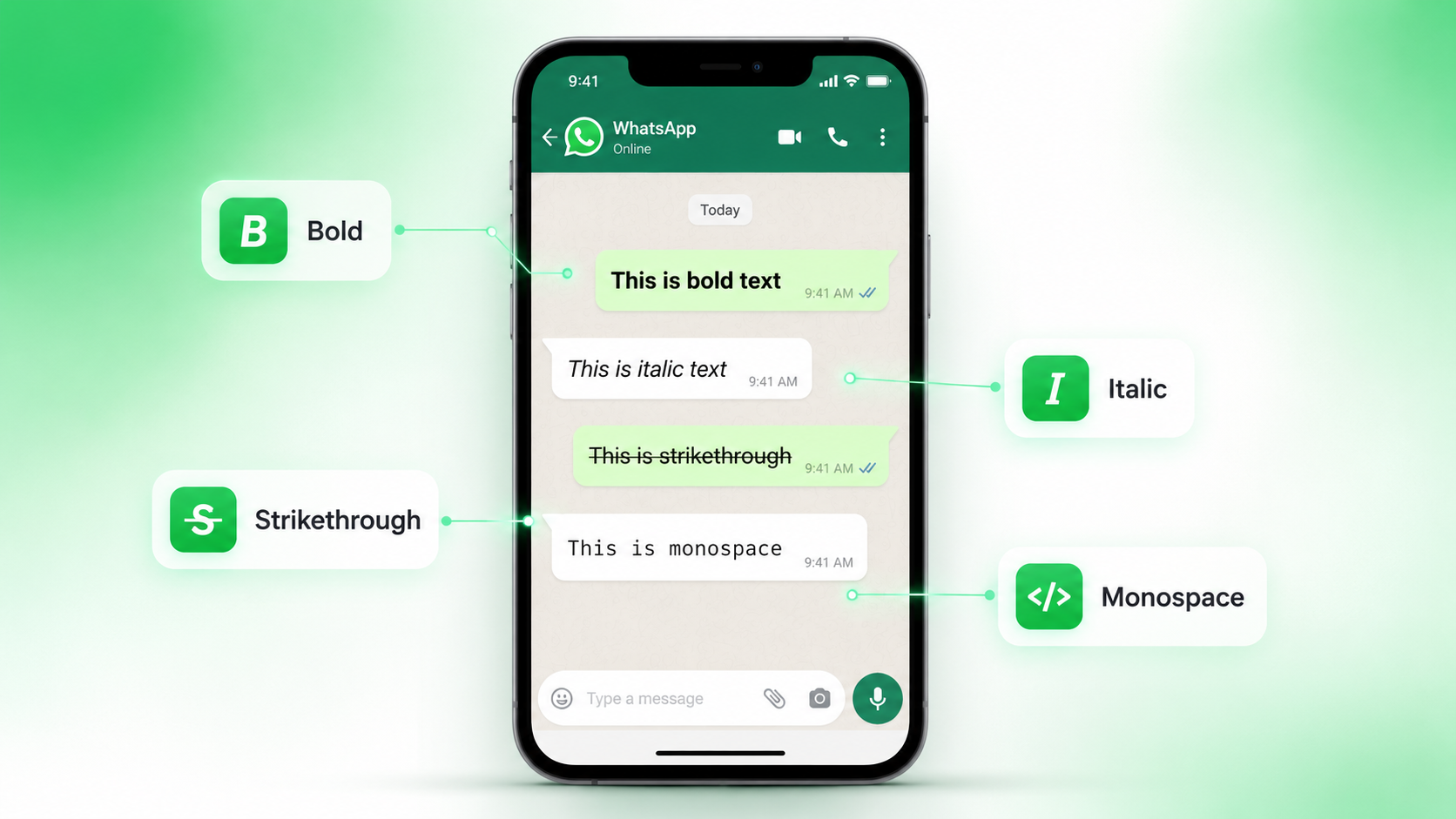
WhatsApp supports a rich text system — you can make text bold, italic, strikethrough, and monospace — but the catch is that you must type special characters around your words for the formatting to work. Most people either don't know this exists, or they make typo errors that break the formatting completely.
A dedicated formatter solves both problems at once. A live preview panel shows you exactly how your message will appear inside WhatsApp before anyone else sees it, eliminating embarrassing formatting mistakes.
WhatsApp formatting works on Android, iPhone, WhatsApp Web, and WhatsApp Desktop — so every formatting trick you learn here works for every user who receives your message, regardless of their device.
WhatsApp Formatting Syntax Cheat Sheet
Here are all six formatting styles WhatsApp supports right now:
| Syntax to Type | Format Applied | Example Output |
|---|---|---|
*your text* |
Bold | Hello World |
_your text_ |
Italic | Hello World |
~your text~ |
Strikethrough | Hello World |
```your text``` |
Monospace | Hello World |
*_your text_* |
Bold + Italic | Hello World |
> your text |
Block Quote | Hello World |
Why You Need a WhatsApp Message Formatter for Business
Plain text is invisible in a busy chat. When you send a price list, a product announcement, or a customer support reply without any formatting, the important information blends into everything else. Formatting solves this by creating visual hierarchy — guiding the reader's eye exactly where you want it to go.
Here are five concrete reasons why every business and professional needs a WhatsApp Message Formatter:
Bold headers, clear sections, and structured lists make your messages look polished — not like they were typed on a bus.
Formatted messages are easier to read at a glance. Customers who understand your message quickly are more likely to reply immediately.
Use bold to emphasise prices, deadlines, or calls to action so the most important detail is never missed.
Typing syntax by hand causes mistakes. The formatter adds symbols correctly every time, so your message always renders as expected.
Format entire messages in seconds. No need to remember codes or wrap text manually — click once and it's done.
Formatting displays correctly on all platforms — Android, iOS, WhatsApp Web, and desktop — for every recipient.
How to Use the WhatsApp Message Formatter — Step by Step
You don't need any technical skills to use our free WhatsApp Message Formatter at whatolls.sbs. Follow these five simple steps and you'll have a perfectly formatted message ready to send in under a minute:
-
Open the Free Message Formatter Tool
Visit whatolls.sbs/tools/message-formatter in any browser on your phone or computer. No account, no signup, no installation required — it works instantly.
-
Type or Paste Your Message
Write your message directly in the text area, or paste text you've already prepared. The tool supports any language including English, Urdu, Arabic, Hindi and more.
-
Select Text and Click a Format Button
Highlight the word or phrase you want to format, then click Bold, Italic, Strikethrough, or Monospace. The correct symbols are added automatically around your selection.
-
Preview the Result Live
The live WhatsApp preview panel on the right shows exactly how your message will look inside WhatsApp — including all formatting rendered correctly — before you send it to anyone.
-
Copy and Paste Into WhatsApp
Click the Copy button, switch to WhatsApp on your phone or browser, paste the message into any chat, and press Send. Your formatting appears exactly as previewed.
Use the formatter to create message templates for your most common replies — sales follow-ups, order confirmations, support answers — then save the formatted text in your notes app for instant copy-pasting later.
WhatsApp Message Formatter vs Other Methods
There are three ways to format a WhatsApp message. Here is an honest comparison so you can see why using a dedicated formatter is always the smartest choice:
| Feature | Free Formatter Tool | WhatsApp Built-in | Manual Typing |
|---|---|---|---|
| Live Preview | ✔ Yes | ✔ Yes | ✘ No |
| Works on Desktop | ✔ Yes | ✘ Limited | ✔ Yes |
| One-Click Formatting | ✔ Yes | ✘ No | ✘ No |
| No Typo Errors | ✔ Yes | ✘ Possible | ✘ Very likely |
| Combine All Formats | ✔ Easy | ✘ Tricky | ✘ Very tricky |
| Requires Phone | ✔ No | ✘ Yes | ✘ Yes |
| Free to Use | ✔ 100% Free | ✔ Free | ✔ Free |
While WhatsApp's built-in formatting (hold text to select, then tap Bold/Italic) works on mobile, it is slow and unavailable when composing messages on a desktop. Manual typing is fast only if you never make mistakes — but a misplaced space or wrong symbol breaks the entire format silently. The online formatter eliminates all of these friction points.
Tips to Get the Best Results From WhatsApp Formatting
Knowing how to format text is the first step. Knowing when and how to use it is what separates good communicators from great ones. Here are seven proven tips:
- Use bold sparingly. If everything is bold, nothing stands out. Reserve bold for prices, deadlines, product names, and calls to action only.
- Lead with the most important word in bold. People scan messages before they read them — put your key point at the top in bold so it's seen even if nothing else is.
- Use italic for tone or context. Italic works well for quotes, technical terms, or adding a conversational nuance — like saying something gently rather than directly.
- Use strikethrough for price comparisons. Showing
Old Price: $50then New Price: $35 is one of the most effective sales formatting tricks on WhatsApp. - Use monospace for order IDs, codes, or numbers.
Order #WA20240815looks clean, precise, and professional — exactly what customers need for reference. - Don't over-format long messages. For lengthy messages, use bold only for section headers and keep the body plain. Too many styles at once makes text harder — not easier — to read.
- Always preview before copying. Use the live preview panel in the formatter to check your message looks correct before sending. One second of checking saves many seconds of embarrassment.
Frequently Asked Questions
* bold * instead of *bold*. Another common issue is using "smart quotes" (curved apostrophes) instead of straight asterisks or underscores. Using the online formatter tool eliminates both problems because it applies the symbols correctly every time.
*_like this_* gives you bold italic text. You can also mix formats across different lines and paragraphs — for example bold headers with italic body text — to create well-structured, professional messages.
Ready to Send Perfectly Formatted Messages?
Join thousands of businesses and professionals who use our free WhatsApp Message Formatter every day. No signup. No limits. Works instantly on mobile and desktop.
✏️ Try the Free Message Formatter →100% Free · No Account Needed · Works on Android, iPhone & WhatsApp Web