WhatsApp Number Validator Free — Check If Any Phone Number Has WhatsApp (2026)
WhatsApp Number Validator Free — Check If Any Phone Number Has WhatsApp (2026)
Stop wasting time messaging invalid numbers. Verify any WhatsApp number in seconds — single check or bulk validation — with our free online tool.
Imagine spending an hour crafting the perfect WhatsApp marketing campaign, sending it to 500 contacts, and discovering that nearly a third of those numbers don't even have WhatsApp. Not only did you waste precious time — you may have also triggered spam filters that put your number at risk of being banned. A WhatsApp Number Validator solves this problem before it happens. This complete guide explains what it is, why every business needs it, and how to use ours for free at whatolls.sbs in under a minute.
What Is a WhatsApp Number Validator?
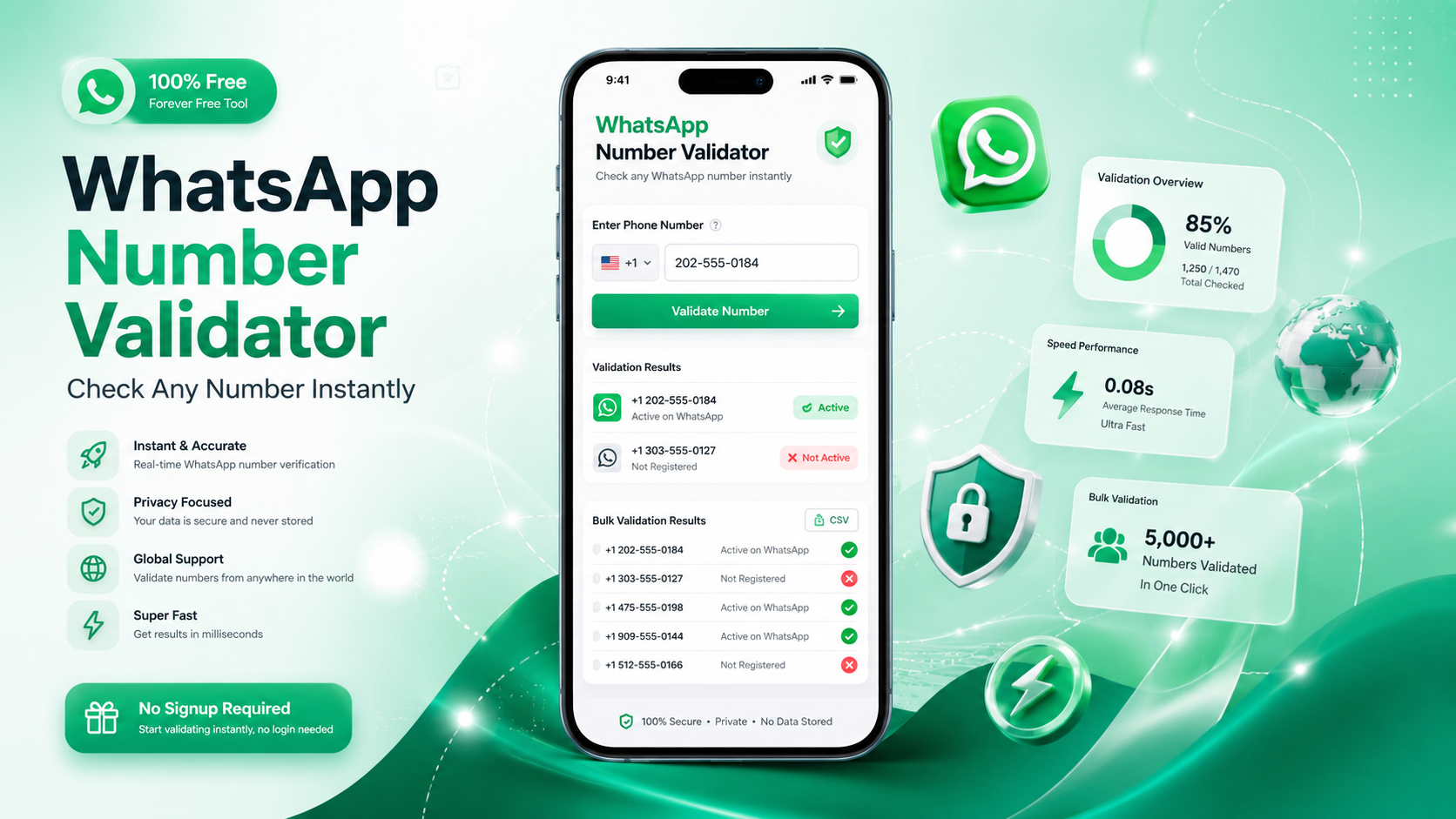
A WhatsApp Number Validator is a free online tool that checks whether a phone number is registered and active on WhatsApp. You enter any phone number — with or without a country code — and the tool instantly tells you whether that number has a WhatsApp account linked to it.
Unlike simply opening WhatsApp and searching manually, a dedicated validator handles the heavy lifting automatically. It also formats the number correctly, adds the right country code if missing, and accepts bulk lists so you can verify hundreds of numbers at once instead of checking them one by one.
Our free tool at whatolls.sbs/tools/whatsapp-number-validator supports both single-number validation and bulk validation — paste a list of numbers, click one button, and get a clean result instantly.
On average, 20–35% of contact lists in marketing databases contain phone numbers that are not registered on WhatsApp. Validating before you send can save hours of wasted effort and protect your account from spam reports.
Why Phone Number Validation Matters — By the Numbers
Why You Need a WhatsApp Number Validator for Business
Whether you run a small shop, manage a sales team, or handle WhatsApp marketing for clients, validating numbers before outreach is one of the most impactful habits you can build. Here are six concrete reasons why:
Manually checking each number in WhatsApp takes 30–60 seconds per contact. Bulk validation checks hundreds in the same time.
Messaging invalid numbers repeatedly increases the chance of WhatsApp flagging your account as spam, risking a temporary or permanent ban.
Clean lists mean every message reaches a real, active WhatsApp user — improving open rates, reply rates, and conversion rates.
If you pay for WhatsApp Business API per message, sending to invalid numbers is money thrown away. Validate first, send only to valid contacts.
The tool automatically formats international numbers with the correct country code, eliminating errors from missing or wrong dial codes.
Import your contact list, validate all numbers in bulk, and export a clean verified list directly back into your CRM or spreadsheet.
Who Uses a WhatsApp Number Validator?
| Who | Why They Validate | Benefit |
|---|---|---|
| Sales Teams | Verify leads before outreach campaigns | Higher contact rate, fewer bounces |
| Marketing Agencies | Clean client lists before bulk sends | Better campaign ROI, protected sender reputation |
| E-commerce Stores | Confirm customer numbers at checkout | Reliable order updates and support |
| Freelancers | Check if prospects are reachable on WhatsApp | Start conversations on the right channel |
| Real Estate Agents | Verify buyer and tenant contact details | Never miss a lead due to wrong number |
| HR Teams | Validate candidate contact numbers | Smooth interview scheduling via WhatsApp |
How to Use the WhatsApp Number Validator — Step by Step
Our free WhatsApp Number Validator at whatolls.sbs requires zero technical skills and no account. Here is how to use it in under 60 seconds:
-
Open the Free Number Validator Tool
Visit whatolls.sbs/tools/whatsapp-number-validator in any browser on your phone or computer. No signup, no installation, no app download required — it loads instantly.
-
Enter the Phone Number
Type or paste any phone number into the input field. You can include the country code with a + sign (e.g. +92 300 1234567) or enter just the digits — the tool figures out the correct format automatically.
-
Click Validate
Press the Validate button. The tool checks the number instantly and shows you whether it is active on WhatsApp, along with the correctly formatted international version of the number.
-
Use Bulk Validation for Multiple Numbers
For lists of numbers, use the Bulk Validation section — paste one number per line, then click Validate All Numbers. The tool processes your entire list and shows which numbers are valid and which are not, all at once.
-
Copy Your Clean List and Use It
Copy only the valid numbers from the results, paste them into your CRM, contact manager, or campaign tool, and start your outreach with complete confidence that every contact is reachable on WhatsApp.
Before running any WhatsApp marketing campaign, always validate your full contact list first. Combine the Number Validator with our Bulk Message Sender for the most efficient and safe outreach workflow — clean list in, maximum results out.
WhatsApp Number Validator vs Other Methods
There are a few ways to check if a number is on WhatsApp. Here is an honest side-by-side comparison to show why the free validator tool is the most practical choice for any serious user:
| Feature | Free Validator Tool | Manual WhatsApp Check | Save & Check Method |
|---|---|---|---|
| Speed | ✔ Instant | ✘ 30–60 sec/number | ✘ 2–3 min/number |
| Bulk Validation | ✔ Yes — 100s at once | ✘ No — one by one | ✘ No — one by one |
| Phone Required | ✔ No — browser only | ✘ Yes | ✘ Yes |
| Auto-Format Country Code | ✔ Yes | ✘ Manual | ✘ Manual |
| Works on Desktop | ✔ Yes | ✘ Limited | ✘ No |
| No Cluttered Contacts | ✔ Yes — no saving needed | ✘ Must open chat | ✘ Must save contact first |
| Free to Use | ✔ 100% Free | ✔ Free | ✔ Free |
The traditional "save and check" method requires you to save a number to your phone contacts, open WhatsApp, search for the contact, and see if a profile appears — then delete the contact if it's invalid. For a single number this is inconvenient. For a list of 200 numbers it is simply impossible to do efficiently without a dedicated tool.
Tips to Get the Best Results From WhatsApp Number Validation
Validation is most powerful when it's part of a consistent workflow. Here are seven tips to get the most out of the tool every single time:
- Always include the country code. Numbers without a country code can lead to ambiguous results. Always use the international format (e.g. +1 for USA, +44 for UK, +92 for Pakistan) for the most accurate validation.
- Validate before every campaign, not just once. People change their WhatsApp numbers or delete accounts regularly. A list that was clean six months ago may have 10–15% invalid numbers today. Re-validate before each major send.
- Use bulk validation for lists of 10 or more. The single validator is great for quick one-off checks. For anything larger, use the bulk input field — paste your whole list and save yourself significant time.
- Remove spaces and special characters before pasting. Numbers like "0300 123 4567" or "+92-300-1234567" may cause parsing issues in some tools. Clean your list to plain digits with country codes before validating for the cleanest results.
- Segment your list after validation. Don't just discard invalid numbers — move them to a separate list and try reaching those contacts on SMS, email, or a phone call. They're still potential customers, just not WhatsApp users.
- Pair validation with the Click to Chat tool. After validating, use our Click to Chat Generator to instantly create wa.me links for every valid number — ready for your campaign or sales outreach.
- Validate new leads immediately. Train your team to validate every new lead's number the moment it comes in — before it enters your CRM — so your database stays clean from day one.
Frequently Asked Questions
Ready to Clean Your WhatsApp Contact List?
Stop wasting time on invalid numbers. Use our free WhatsApp Number Validator to verify any number instantly — single or bulk. No signup. No limits. Works on all devices.
✅ Try the Free Number Validator →100% Free · No Account Needed · Single & Bulk Validation · Works on Mobile & Desktop